Industry / Sports venues and arenas

The whole bowl,one signal.

Every scoreboard, ribbon, concourse TV and suite screen plays from one StreamVue system on your own network. The OB feed comes in through Vivo as a channel, every screen tunes to it in sync over multicast, suites get a branded remote, and one command switches the whole venue to the sponsor playlist.

Ascot Racecourse has run on StreamVue since 2006, with over 1,000 displays. RAC Arena Perth has since 2012.

What changes on a matchday

Better days for fans, guests, staff and the books

StreamVue is one system for every screen in the venue, so each group gets what it needs from the same picture.

For fans

The same moment on every screen

  • The OB feed, satellite and aerial channels and the venue cameras come in through Vivo and go out as one multicast channel, so the concourse TV shows the same frame as the big screen.
  • Replays and highlights come from Encore recordings, started from the guide or scheduled by programme.
  • Wayfinding, queue information and food and drink promotions sit beside the live picture in a Symphony layout on the same screen.
  • Screens keep playing from the on-site appliances if the internet drops.
For VIP guests

A suite that works like their own room

  • A branded StreamVue Remote on the suite tablet: the channel list, volume and a multiview of several feeds, in the venue’s colours. Check out this example we created for Birmingham’s Alexander Stadium.
  • Suite screens see the channel package tagged for suites and nothing else.
  • A welcome screen or sponsor message from Symphony before the guests arrive, on a schedule.
  • The TV remote stays locked where it should be, and the suite still has full control from the tablet.
For staff

One console for the whole venue

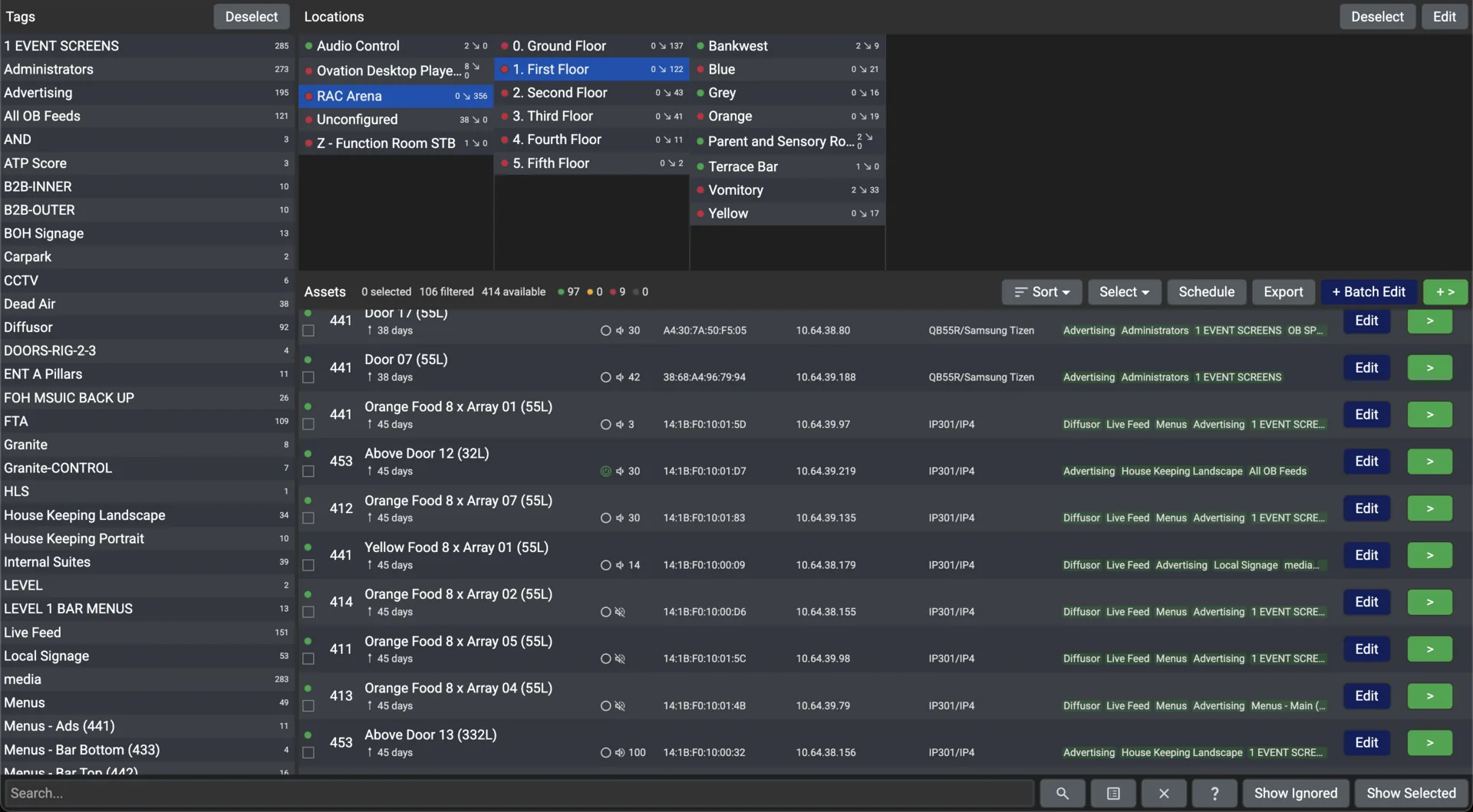
  • Conductor lists every screen by stand, level and suite with its status, and batch mode changes every tagged screen in one command.
  • Profiles and schedules run the day: gates open, kick-off, half time, reset. A changeover from one event type to another is a stored profile, not a re-patch.
  • StreamVue Remote on a phone changes a channel from the concourse, paired with a code or signed in for full control.
  • New TVs are labelled from the identity screen, and a QR tag on each unit reports a fault to the support portal.
For the business

Sponsor inventory you can prove

  • Change a sponsor’s logo once in a Symphony template and every playlist that uses it follows.
  • Sponsor slots switch on a Conductor schedule, or on a cue from your scoring or timing system through the Chorus API.
  • The event log and usage statistics export as proof of play for the sponsor report.

A venue edition in practice

Built for Birmingham’s Alexander Stadium

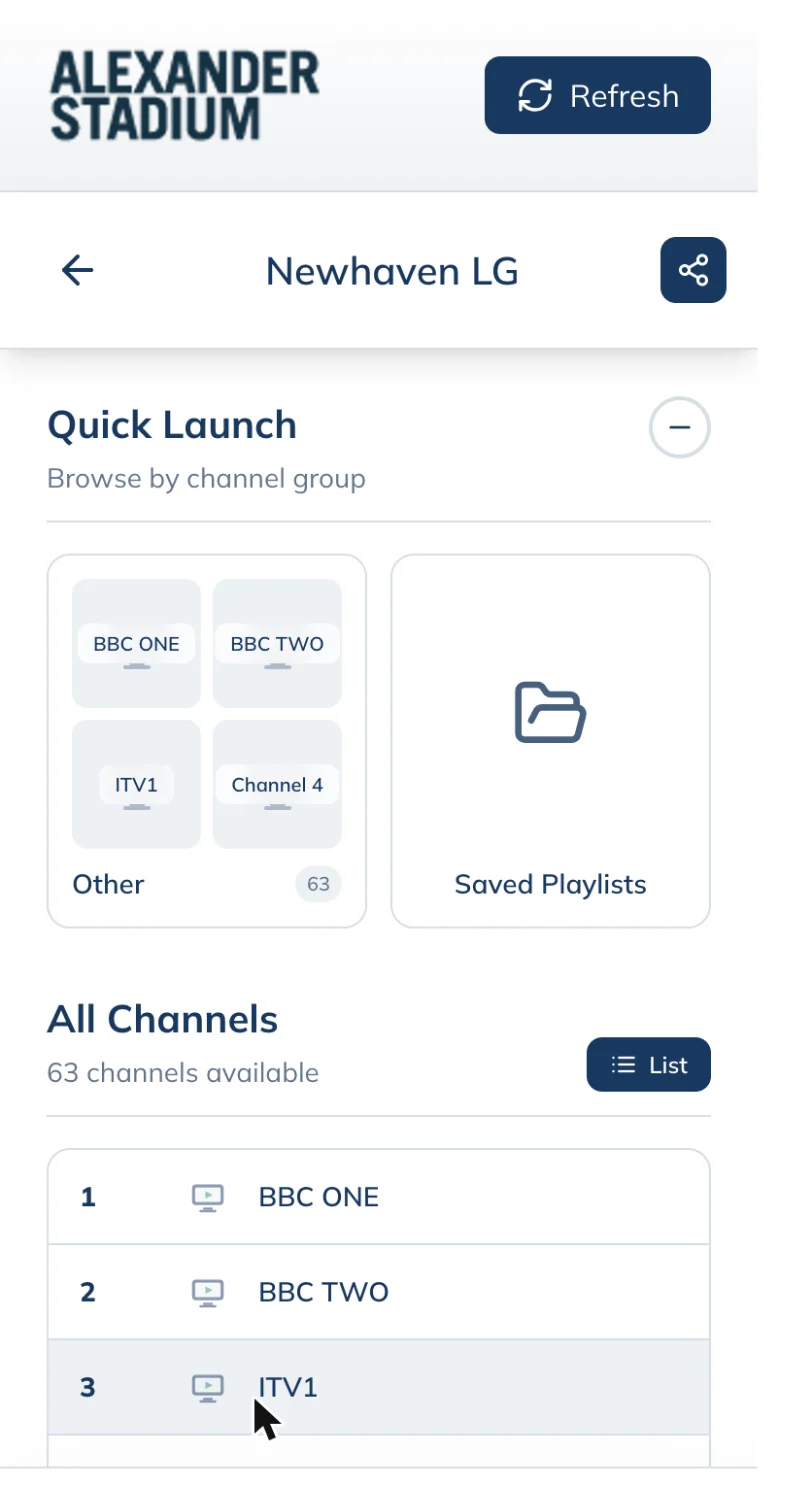
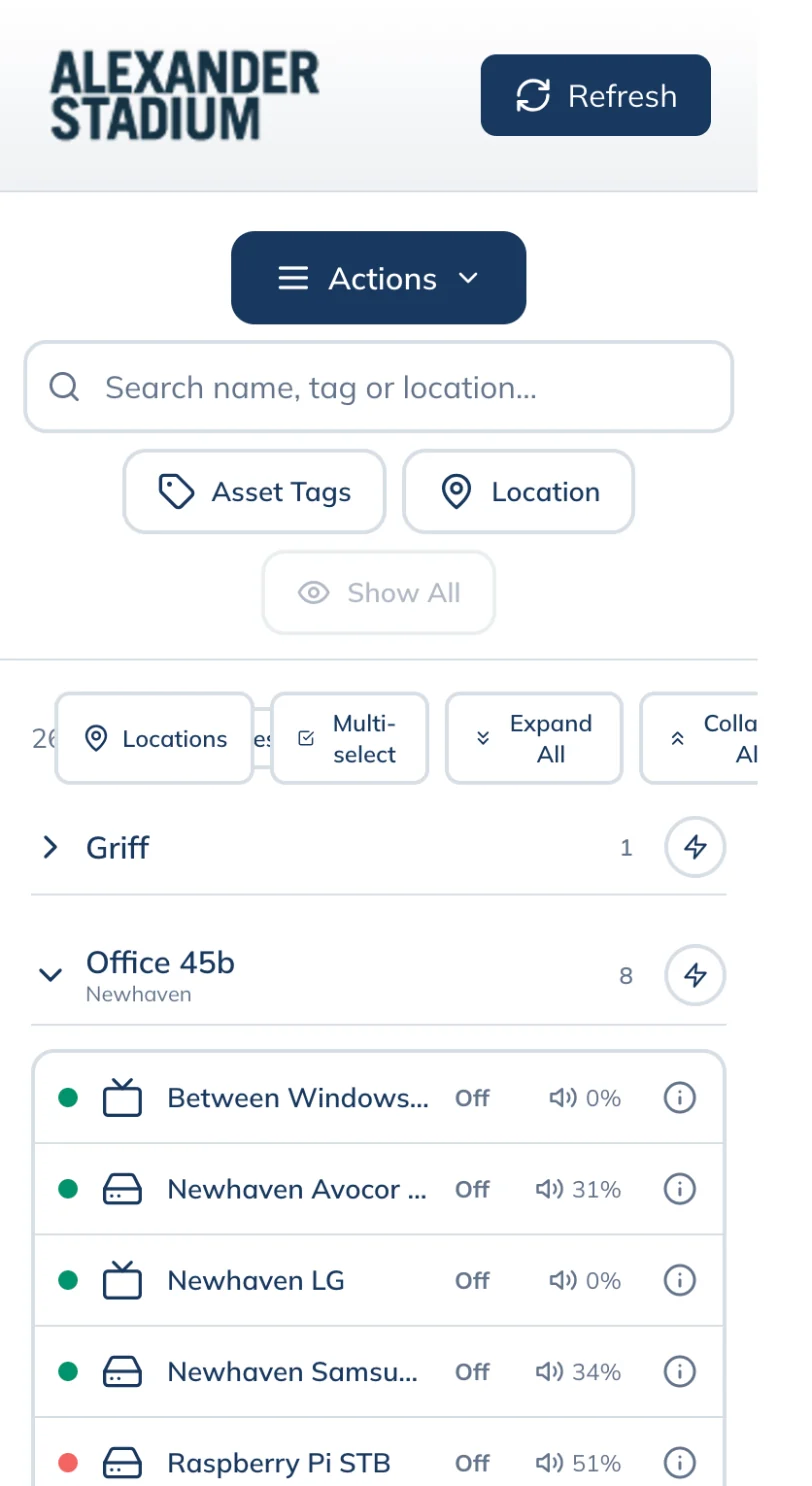
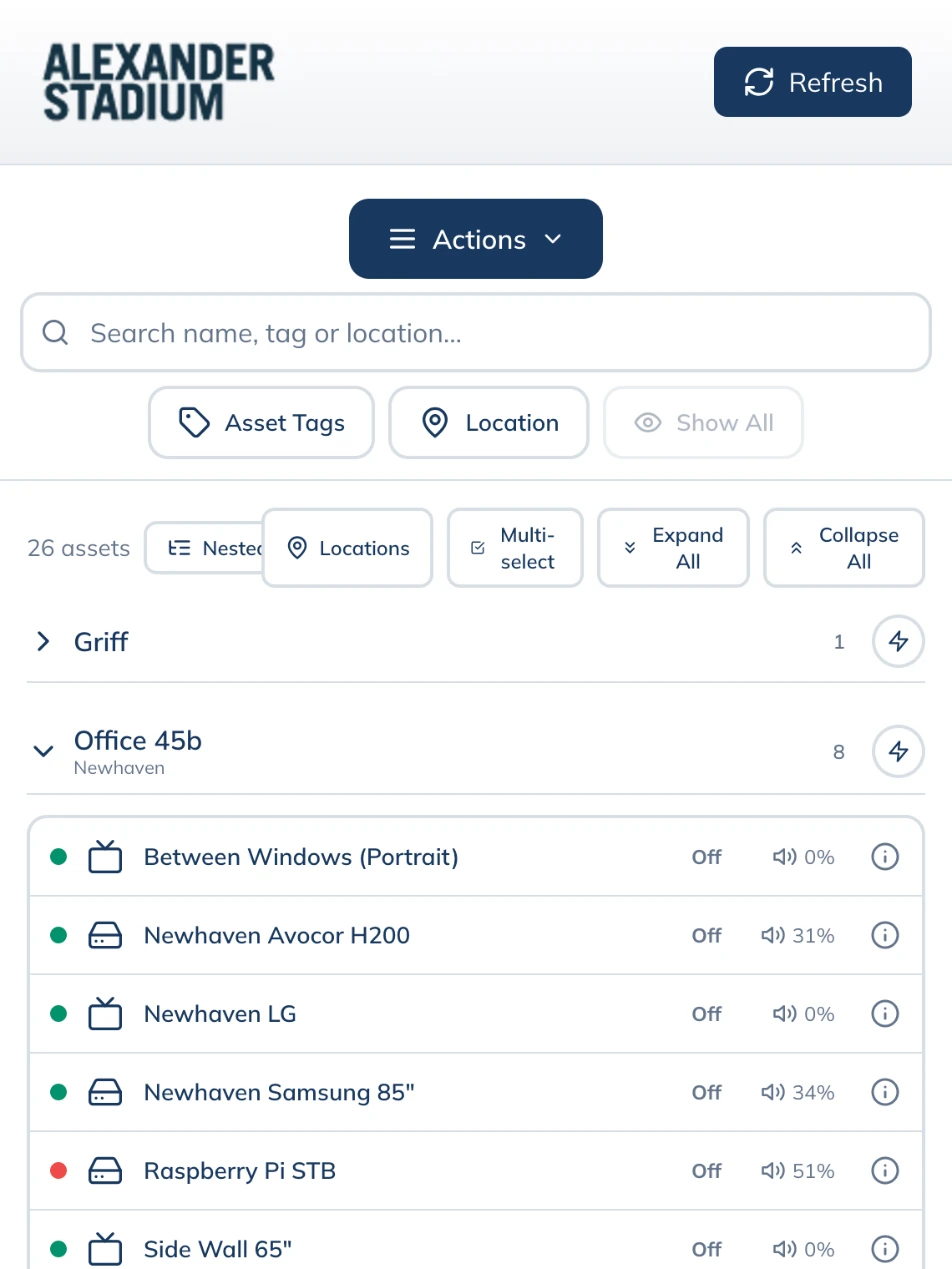
The same StreamVue Remote web app, in the stadium’s own name, logo and colours, with only the screens and controls the venue chose to expose. A suite tablet or a steward’s phone opens it and sees the stadium, not someone else’s software.

How a venue edition is made
The Alexander Stadium edition on a phone: screens grouped by location
The Alexander Stadium edition on a tablet
The Alexander Stadium edition on a phone: the channel list for one screen

Captured from the Alexander Stadium build of StreamVue Remote, paired to StreamVue’s own office screens.

Every zone, one platform

From the big screen to the back of house

Each zone gets its own channels, layouts and schedules, all from the same Chorus portal.

  1. 01
    Main bowl and scoreboards

    The OB feed and the venue cameras as channels from Vivo; every big screen and ribbon tuned to the same multicast stream.

    Vivo
  2. 02
    Concourse and concessions

    Symphony layouts with the live game in a video zone and menus and wayfinding beside it; schedules switch them through the day.

    Symphony
  3. 03
    Suites and lounges

    Ovation’s guide shows the suite channel package; a branded StreamVue Remote on the tablet; welcome screens by schedule.

    Custom VIP
  4. 04
    Press and broadcast positions

    Return feeds as channels, and a multiview layout on a monitor wall.

    Vivo
  5. 05
    Back of house

    Staff channels that only appear on screens tagged for them; Conductor powers them down on schedule.

    Conductor
  6. 06
    Exterior LED and out-of-home

    Sponsor rotations on a Conductor schedule, switched on a cue through the API.

    Conductor
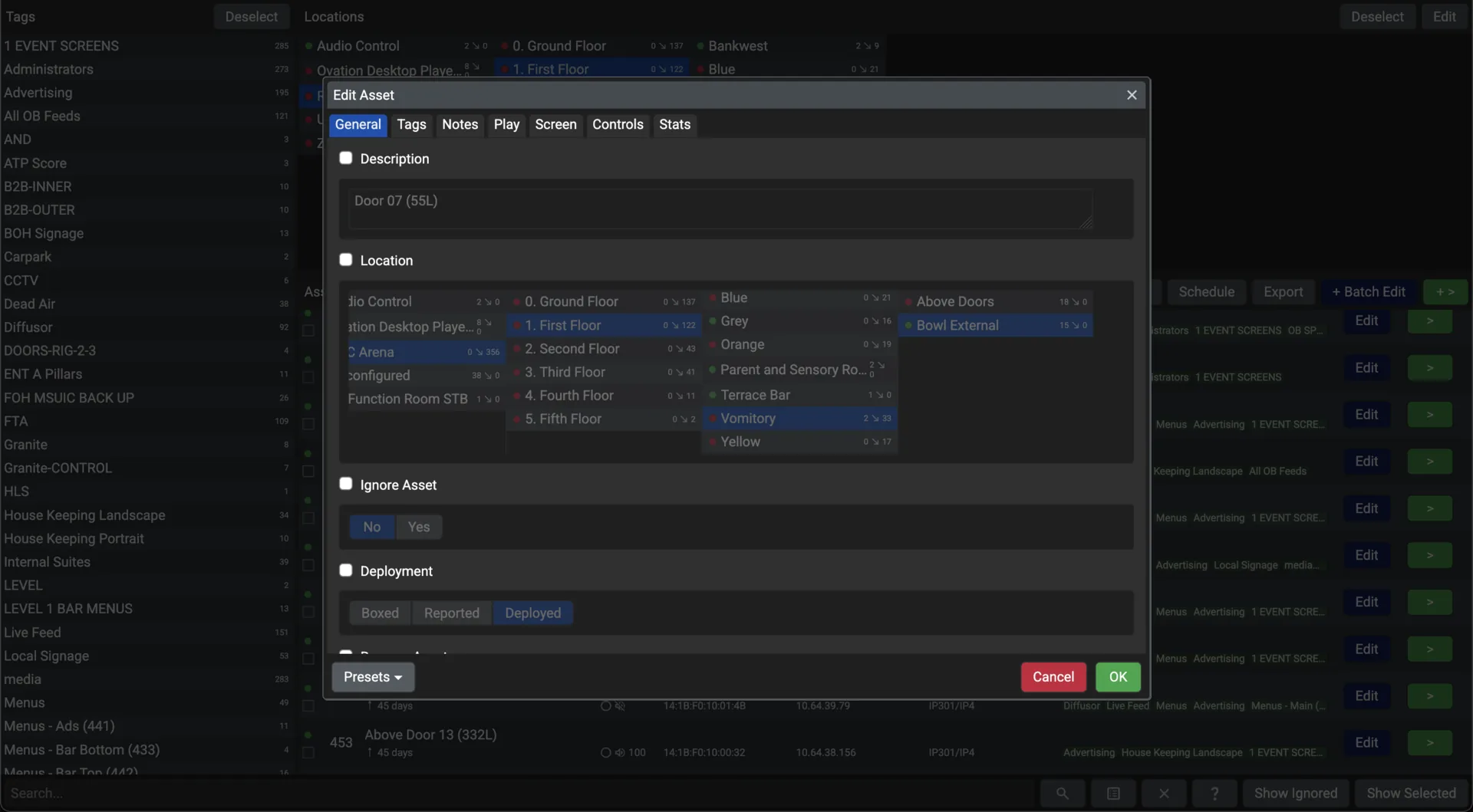
The Edit Asset window in Conductor with the branching list of locations open, over the list of screens
Assigning a screen to its place in Conductor: the venue as a branching system of floors, bars and suites, with the screen list behind. Captured on a live system.
Matchday on StreamVue

A venue day, minute by minute

A realistic timeline of StreamVue running the floor: automation, failover and orchestration invisible to everyone except the operators who trust it.

17:30

Gates open

Concourse screens switch from the pre-match loop to the welcome sequence on a Conductor schedule; the sponsor playlists are already in place.

19:45

Kickoff

Vivo puts the OB truck’s SDI feed on the network as a channel; the scoreboard, concourse screens and suite screens tune to it in sync.

20:30

Halftime pivot

One batch command switches every tagged screen to the sponsor playlist; a single template change swaps the logo on all of them.

23:00

Venue reset

Conductor restores the default signage and powers the back-of-house screens off on schedule; the event log records the day.

Built on what you have

Standard network, commercial screens, your own building

Nothing exotic underneath: the IP network the venue already runs, commercial TVs, a browser and an appliance rack on site.

Your own IP network

Multicast on standard switches, AES encrypted where it matters. Nothing leaves the building unless you send it.

Commercial TVs without a box

Ovation runs on LG ProCentric and Samsung SSSP TVs, on Amino decoding devices, Raspberry Pi and Linux players, and as a desktop app.

Any browser

Chorus is a web portal: nothing to install for operators, and single sign-on with Active Directory, LDAP or SAML.

Works without the internet

Satellite, aerial, the filestore and the on-site cameras are unaffected by an internet outage, and staff on the network keep full control.

An open API

The portal uses the Chorus REST API itself, so scoring, timing and fire-alarm systems can drive the same screens.

Support that knows your estate

Every unit in the support portal with its contract and documents, and a QR tag on it for fault reports.

Proof

Venues that run on StreamVue

The figures are from the case studies, which you can read in full.

1,000+

displays at Ascot Racecourse, the largest documented stadium IPTV deployment in the world.

Ascot Racecourse
21

race meetings a year at Ascot, Royal Ascot among them.

Ascot Racecourse
2006

the year Ascot went live on StreamVue.

300+

screens at RAC Arena Perth, including the centre-hung screens and the 360-degree ribbon.

RAC Arena Perth

Run your venue on one signal

See StreamVue on your own matchday, with a demo from our venue team.